
You may be concerned about the cost of the AI tokens since you’re using your own API key with Resolver.
We can’t tell you outright what the cost will be because it depends on many factors, but we’ve provided a cost calculator below to help set expectations.
Compare every model
| Model | Input, per million tokens | Output, per million tokens | Estimated monthly cost |
|---|
Why your cost will vary
We based our averages on real AI model pricing and the chatbot activity we’ve seen on our own websites. With that said, each website is unique, and your costs will vary.
For instance, if users tend to send more messages per chat, the costs will be higher. Or, if you give the chatbot instructions to provide lengthy replies, that will also increase the cost. The calculator assumes Resolver’s default settings
What are input and output tokens?
Input tokens are spent on the text sent to the AI model. We assumed the most website content Resolver can send with each message, so the estimate errs on the pricey side.
Output tokens are spent on the text the AI model returns for its answer. We used an average reply length from default settings. The chatbot’s replies could use more output tokens if you tell it to provide long and detailed replies in the Instructions menu.
Are the more expensive models worth it?
We have guidance for selecting an AI model for your chatbot, but our general recommendation is to use the cheapest model available.
For a customer support chatbot, you don’t need deep reasoning skills. It receives the customer’s question along with content from your site that should contain the answer, so it just needs to formulate an acceptable reply from the provided content. The lighter models end up running faster and providing adequate replies while costing significantly less.
Training costs are not included in the estimate
The cost calculator is for the chatbot’s replies only and does not include training because the cost of the training (embedding) APIs is extremely cheap.
Training 200 pages that contain 2,000 words each costs $0.01 when using an OpenAI embedding model and $0.12 when using a Gemini embedding model (or $0 on their free tier). After the initial training, you will use fewer tokens since Resolver will only be training when you publish new pages and update existing pages.
Anthropic does not have an embedding model, so Claude users need an OpenAI or Gemini key for training.
No surprise bills
We believe strongly in providing full transparency into Resolver’s token use. If you are using the same AI API key for multiple plugins on your site, it’s important to understand how much each one is spending.
That’s why Resolver includes a full Token Usage dashboard that documents the number of input, output, and training (embedding) tokens used.
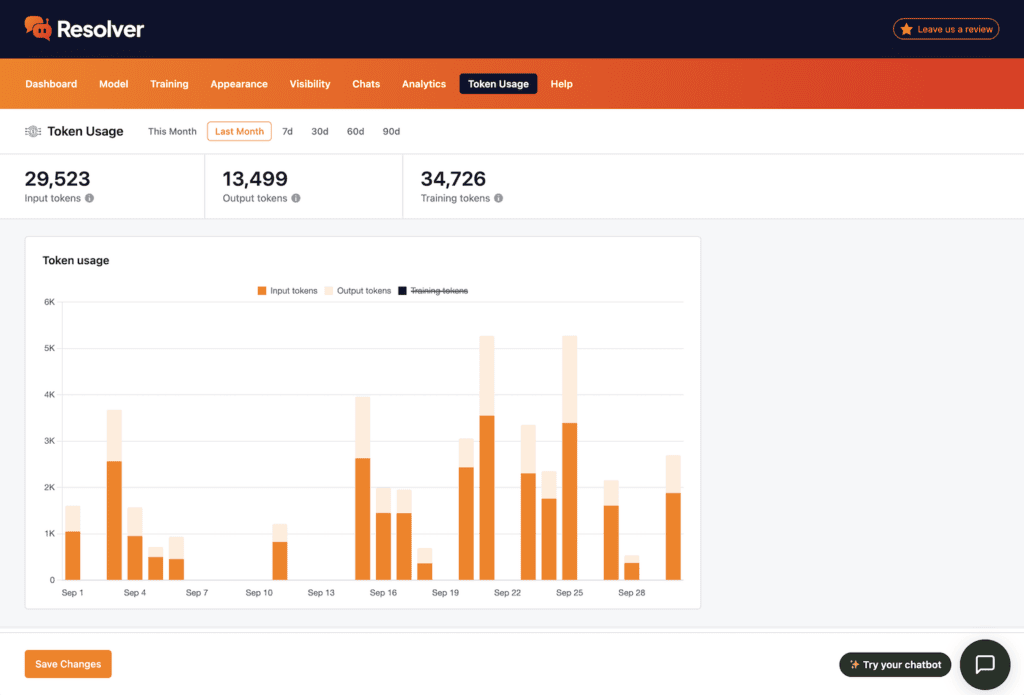
Resolver also includes an option to set a monthly token limit and enable email alerts for when you approach your limit. If you ever do hit the limit, the chatbot is removed from the site until next month.