
Your Visitors Can Spot Unbranded Elements in Seconds

Don't get caught with an off-the-shelf widget on your site when you can fully customize Resolver to match your brand.

Here's How You Can Customize Your Chatbot

Custom name
Give Your Bot the Perfect Name

Name your bot to match your brand message. We recommend making it clear that it’s an AI-powered chatbot, so visitors understand the nature of the chatbot.

Customizing the chatbot name
Custom color
Tailor the Color to Your Brand

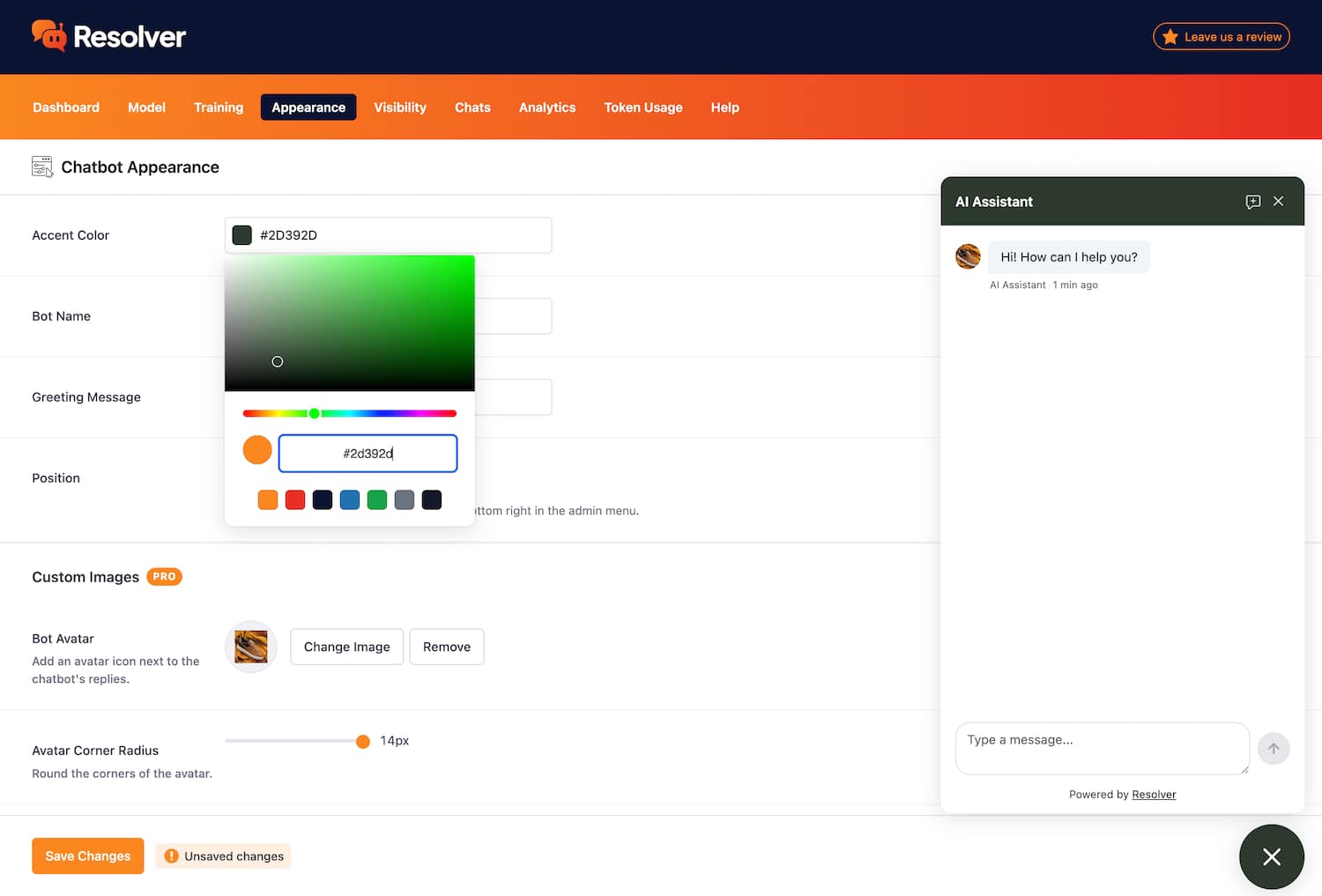
The chatbot uses a primary accent color, which you can change easily from the Appearance menu.

Customizing the chatbot's color
Custom greeting
Choose a Custom Greeting Message

Your chatbot’s greeting is a great opportunity to further brand your bot by adding a welcome message that matches your business’s style and tone.

Changing the chatbot's greeting message
PRO
Add a Custom Avatar for Your Chatbot

Further personify your bot with an avatar that matches your brand. This could be your logo icon or a graphic made exclusively for your bot.

Uploading a new avatar for the chatbot
PRO
Remove the Resolver Attribution Link

As a Pro customer, you have total control over the chat widget and can remove the attribution link added in the free version of Resolver.

Removing the attribution link from the widget footer

Consistent Branding is Hard

It's tough keeping your design on brand. That's why we included simple, powerful customization options in Resolver that make it fit seamlessly into your site.

View Pricing
Built by the creators of Independent Analytics
Reviewed & approved by the official Plugin Review Team
Tested on WordPress 7.1

Get Started

Follow these three easy steps
1
Download Resolver
Resolver can be installed in seconds like any other WordPress plugin.
2
Configure your chatbot
Pick a model and train the chatbot on your content.
3
Watch your chatbot get to work
Resolver starts answering questions right away.

Frequently Asked Questions

  • Toggle FAQ
    Can I preview my changes before going live?

    Yes, all changes can be previewed via the Appearance menu before you save your edits. Additionally, the chatbot is not displayed on your site until you set it live via the Visibility menu.

  • Toggle FAQ
    How can I remove the attribution link?

    The attribution link in the chat widget can be removed in Resolver Pro. There is a checkbox in the Appearance menu you can check to remove it.

Still have questions?

If you have any questions, you can click here to chat with our chatbot. That's right, you can learn all about Resolver by talking to Resolver!

Learn How to Customize Your Chatbot

Follow this simple guide to learn how to customize your chatbot to match your brand's style and tone.
View the full guide
Create Your Fully Branded Chatbot Today
Resolver can be fully customized and working for you in minutes
Download now

Free to install and use as long as you'd like