
Don't operate in the dark

Without the proper analytics, it's hard to tell how well your chatbot is performing for your website.

Here's How Human Request Data Can Improve Your Chatbot

Track requests
Keep Track of Every Request for a Real Human

Any time a visitor asks to speak with a real person, Resolver Pro will record this request and make this data available in the Human Requests menu for your analysis.

Example of a human request
Detailed analysis
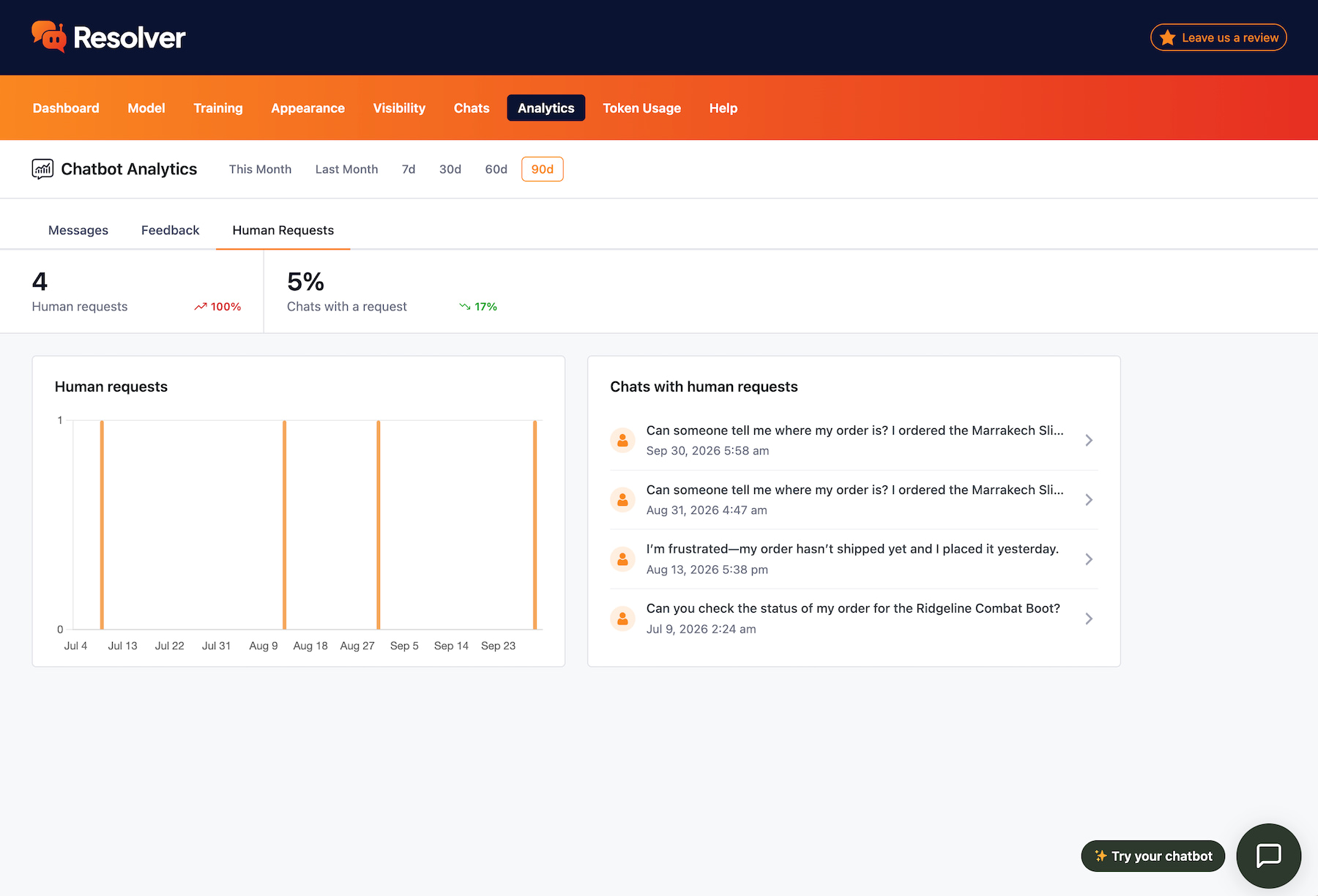
Review Human Requests Over Time

Use the human request analytics to see how often your visitors require a real person to resolve their issues. Track this metric over time and optimize your chatbot to fulfill more requests entirely on its own.

Human request data
Chats menu filtering
Discover Requests via the Chats Menu

Chats with human requests are marked in the Chats menu, so you can identify them easily. Furthermore, there’s a Human Requests filter that lets you view only chats that include such requests.

Reviewing a chat with a human request

Good data is hard to come by

As the creators of the Independent Analytics plugin, we know how important good data is. That's why we built a robust analytics suite for Resolver Pro that can help you steadily improve the ROI of your chatbot.

View Pricing
Built by the creators of Independent Analytics
Reviewed & approved by the official Plugin Review Team
Tested on WordPress 7.1

Get Started

Follow these three easy steps
1
Choose a plan
Choose a plan based on the number of websites you need to install Resolver Pro on.
2
Install on your site(s)
Resolver Pro can be installed in seconds like any other WordPress plugin.
3
Watch your chatbot get to work
Resolver Pro starts answering questions right away.

Frequently Asked Questions

  • Toggle FAQ
    What metrics are included?

    The Human Requests menu can tell you the number of chats with a human request and the percentage of chats that include a human request. Both metrics also include a growth stat, so you can tell if they have been increasing or decreasing over time.

  • Toggle FAQ
    What date ranges can I view?

    You can view the human request data for Last Month, This Month, the Last 7 Days, Last 30 Days, Last 60 Days, or the Last 90 Days.

  • Toggle FAQ
    How are human requests identified?

    Resolver Pro uses a list of common phrases and checks them for similarity when a visitor sends a message. Whenever the nature of the request is to speak with a real person instead of a chatbot, the message is marked as a human request.

  • Toggle FAQ
    What happens when someone requests a real person?

    Resolver will use the instructions set in the Training > Instructions > Fallback section. There, you can tell it exactly how to handle these types of requests. For instance, you can include different email addresses for different departments based on the nature of the visitor’s request.

Still have questions?

If you have any questions, you can click here to chat with our chatbot. That's right, you can learn all about Resolver by talking to Resolver!

Learn How to Analyize Your Human Request Data

Follow this tutorial and learn how further optimize your chatbot using human request data.
View the full guide
Find Out When Your Chatbot is Falling Short
Track every time a visitor requests to speak with a human by upgrading to Resolver Pro.
View Pricing

Resolver Pro starts at $49/year, 30-day money-back guarantee

Explore These Resolver Pro Features Next

Custom Fields
Train your chatbot with custom fields.
Learn more
Product Fields
Train your chatbot with eCommerce product fields.
Learn more
Chat Analytics
Analyze your chatbot's performance.
Learn more
PDF Training
Add PDFs to your chatbot's training data.
Learn more
Training Notes
Easily add notes to train your chatbot.
Learn more
Find Out When Your Chatbot is Falling Short
Track every time a visitor requests to speak with a human by upgrading to Resolver Pro.
View Pricing

Resolver Pro starts at $49/year, 30-day money-back guarantee